Model PCEX2#
Model PCEX is introduced in chapter 4 of Godley and Lavoie [2006] “Monetary Economics: An Integrated Approach to Credit, Money, Income, Production and Wealth”. In its setup, the model has the same transactions and balance sheet as Model PC (see here), but features expectations on disposable income and wealth.
Module Contents#
As with all MacroStat models, PCEX is divided into Variables, Parameters (fixed constants), Scenarios, and the Behavior (model initialization and steps). The module-level documentation, such as all variables/parameters/scenarios and their notation or the behavioral equations associated with each function of BehaviorPCEX.py can be seen in:
The remainder of this page gives an introduction to the model, notes on how it is implemented in MacroStat and then shows some of the model dynamics by replicating the relevant graphs of Godley and Lavoie (2006).
Model Overview#
Behavioral Equations#
Model PCEX2 is an extension of Model PCEX with only one change in equations, namely that we replace the fixed propensity to consume out of income, \(\alpha_1\) with is transformed to
Accordingly, see PCEX for a guide on the remaining equations, or see the behavior documentation.
Transaction Flow Matrix#
Household |
Production |
Government |
CentralBank |
CentralBank |
Total |
|
|---|---|---|---|---|---|---|
Current |
Current |
Current |
Current |
Capital |
||
Consumption Household |
\(-C(t)\) |
\(+C(t)\) |
\(0\) |
|||
Consumption Government |
\(+G(t)\) |
\(-G(t)\) |
\(0\) |
|||
National Income |
\(+Y(t)\) |
\(-Y(t)\) |
\(0\) |
|||
Interest Earned On Bills Household |
\(+r(t-1)\cdot B_h(t-1)\) |
\(-r(t-1)\cdot B_h(t-1)\) |
\(0\) |
|||
Central Bank Profits |
\(+r(t-1)\cdot B_{CB}(t-1)\) |
\(-r(t-1)\cdot B_{CB}(t-1)\) |
\(0\) |
|||
Taxes |
\(-T(t)\) |
\(+T(t)\) |
\(0\) |
|||
Change in Money Stock |
\(+\Delta H_h(t)\) |
\(-\Delta H_{s}(t)\) |
\(0\) |
|||
Change in Bill Stock |
\(+\Delta B_h(t)\) |
\(-\Delta B_s(t)\) |
\(+\Delta B_{CB}(t)\) |
\(0\) |
||
Total |
\(0\) |
\(0\) |
\(0\) |
\(0\) |
\(0\) |
\(0\) |
Balance Sheet Matrix#
Household |
Production |
Government |
CentralBank |
Total |
|
|---|---|---|---|---|---|
Current |
Current |
Current |
Capital |
||
Money Stock |
\(+H_h(t)\) |
\(-H_{s}(t)\) |
0 |
||
Bill Stock |
\(+B_h(t)\) |
\(-B_s(t)\) |
\(+B_{CB}(t)\) |
0 |
|
Wealth |
\(-V(t)\) |
\(+V(t)\) |
0 |
Implementation in MacroStat#
Transposing these eleven equations to the MacroStat framework, we consider that there are:
Four parameters (fixed constants): \(\alpha_{10}\), \(\iota\), \(\alpha_2\), and \(\theta\) (see Parameters)
Two scenario variables : \(G_d(t)\) and \(W(t)\) (see Scenarios)
The remaining tracked series are variables (see Variables)
Model Dynamics#
Preparatory Steps#
%load_ext autoreload
%autoreload 2

import importlib
import logging
import sys

# Import the necessary libraries for plotting
from matplotlib import pyplot as plt
from matplotlib.ticker import PercentFormatter

# Import the MacroStat get_model function
from macrostat.models import get_model

# Custom matplotlib style for the documentation
plt.style.use("../../macrostat.mplstyle")
# We show the logging output in the notebook
importlib.reload(logging)
logging.basicConfig(stream=sys.stdout, level=logging.INFO)
Running the Simulation#
First, we can run the model without any shocks to see the convergence to the steady state.
GL06PCEX2Class = get_model("GL06PCEX2")
model = GL06PCEX2Class()
model.simulate()
output = model.variables.to_pandas()
INFO:root:Starting simulation. Scenario: 0
Here we can also check that the variables are healthy, which means that the redundant equations hold and that all the assets and liabilities are positive. For model PC, the redundant equation is that the household money stock equals the central bank money stock.
Note
In numerical implementations, due to floating point precision it is unlikely that the redundant equation will hold exactly. Therefore, we check that the absolute percentage error is less than a given tolerance, in this case 1e-5. We use the absolute percentage error to appropriately scale the error for different magnitudes of the variables.
model.variables.check_health(tolerance=1e-5)
True
An overview of the first 10 steps of the model
df=model.variables.to_pandas()
df.head(10).T
| 0 | 1 | 2 | 3 | 4 | 5 | 6 | 7 | 8 | 9 | ||
|---|---|---|---|---|---|---|---|---|---|---|---|
| ConsumptionHousehold | 0 | 0.0 | 0.0 | 0.000 | 16.000000 | 28.799999 | 39.279999 | 47.855999 | 54.874001 | 60.617043 | 65.316742 |
| ConsumptionGovernment | 0 | 0.0 | 0.0 | 20.000 | 20.000000 | 20.000000 | 20.000000 | 20.000000 | 20.000000 | 20.000000 | 20.000000 |
| NationalIncome | 0 | 0.0 | 0.0 | 20.000 | 36.000000 | 48.799999 | 59.279999 | 67.856003 | 74.874001 | 80.617043 | 85.316742 |
| InterestEarnedOnBillsHousehold | 0 | 0.0 | 0.0 | 0.000 | 0.000000 | 0.300000 | 0.540000 | 0.736500 | 0.897300 | 1.028888 | 1.136570 |
| CentralBankProfits | 0 | 0.0 | 0.0 | 0.000 | 0.400000 | 0.420000 | 0.442000 | 0.459900 | 0.474550 | 0.486538 | 0.496349 |
| Taxes | 0 | 0.0 | 0.0 | 4.000 | 7.200000 | 9.820000 | 11.964000 | 13.718501 | 15.154261 | 16.329185 | 17.290663 |
| HouseholdMoneyStock | 0 | 0.0 | 0.0 | 16.000 | 16.799999 | 17.680004 | 18.396004 | 18.981998 | 19.461540 | 19.853958 | 20.175087 |
| CentralBankMoneyStock | 0 | 0.0 | 0.0 | 16.000 | 16.800003 | 17.680002 | 18.396004 | 18.981991 | 19.461536 | 19.853958 | 20.175095 |
| HouseholdBillStock | 0 | 0.0 | 0.0 | 0.000 | 12.000000 | 21.599998 | 29.459999 | 35.892006 | 41.155502 | 45.462784 | 48.987556 |
| GovernmentBillStock | 0 | 0.0 | 0.0 | 16.000 | 28.800001 | 39.279999 | 47.856003 | 54.873997 | 60.617039 | 65.316742 | 69.162651 |
| CentralBankBillStock | 0 | 0.0 | 0.0 | 16.000 | 16.800001 | 17.680000 | 18.396004 | 18.981991 | 19.461536 | 19.853958 | 20.175095 |
| Wealth | 0 | 0.0 | 0.0 | 16.000 | 28.799999 | 39.280003 | 47.856003 | 54.874004 | 60.617043 | 65.316742 | 69.162643 |
| InterestRate | 0 | 0.0 | 0.0 | 0.025 | 0.025000 | 0.025000 | 0.025000 | 0.025000 | 0.025000 | 0.025000 | 0.025000 |
| DisposableIncome | 0 | 0.0 | 0.0 | 16.000 | 28.799999 | 39.279999 | 47.855999 | 54.874001 | 60.617043 | 65.316742 | 69.162643 |
| ExpectedDisposableIncome | 0 | 0.0 | 0.0 | 0.000 | 16.000000 | 28.799999 | 39.279999 | 47.855999 | 54.874001 | 60.617043 | 65.316742 |
| ExpectedWealth | 0 | 0.0 | 0.0 | 0.000 | 16.000000 | 28.799999 | 39.279999 | 47.856007 | 54.874001 | 60.617043 | 65.316742 |
| HouseholdBillDemand | 0 | 0.0 | 0.0 | 0.000 | 12.000000 | 21.599998 | 29.459999 | 35.892006 | 41.155502 | 45.462784 | 48.987556 |
Convergence to the Steady State#
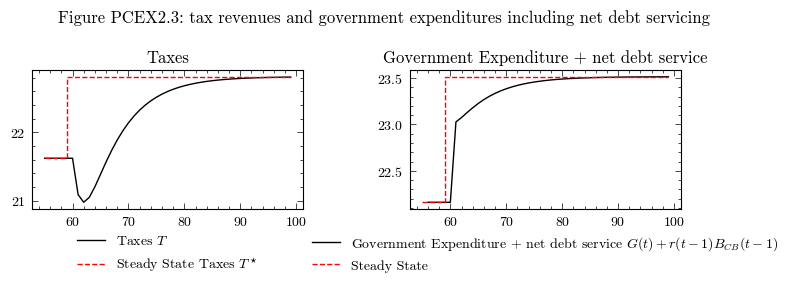
The steady state for Model PCEX is equivalent to model PC, it just has delays in reathing the steady state. In Godley and Lavoie [2006] models are initialized with almost all of the variables set to zero. For model PCEX the only non-zero item is that in period 0 the government demand is 20, i.e. the government creates 20 monetary units of demand.
To aid in our graphing, we can calculate the steady state solutions for the variables following the derivations in Section 4.5 of Godley and Lavoie Godley and Lavoie [2006]:
In macrostat, this solution has been implemented in the compute_theoretical_steady_state() function. We compute this now for scenario=0, which is the case without any shocks and constant government demand \(G\) and interest rates \(r\).
model.compute_theoretical_steady_state(scenario=0)
steadystate = model.variables.to_pandas()
INFO:root:Computing theoretical steady state. Scenario: 0
Perturbation 1: An increase of 100 points in the rate of interest on bills (\(r\))#
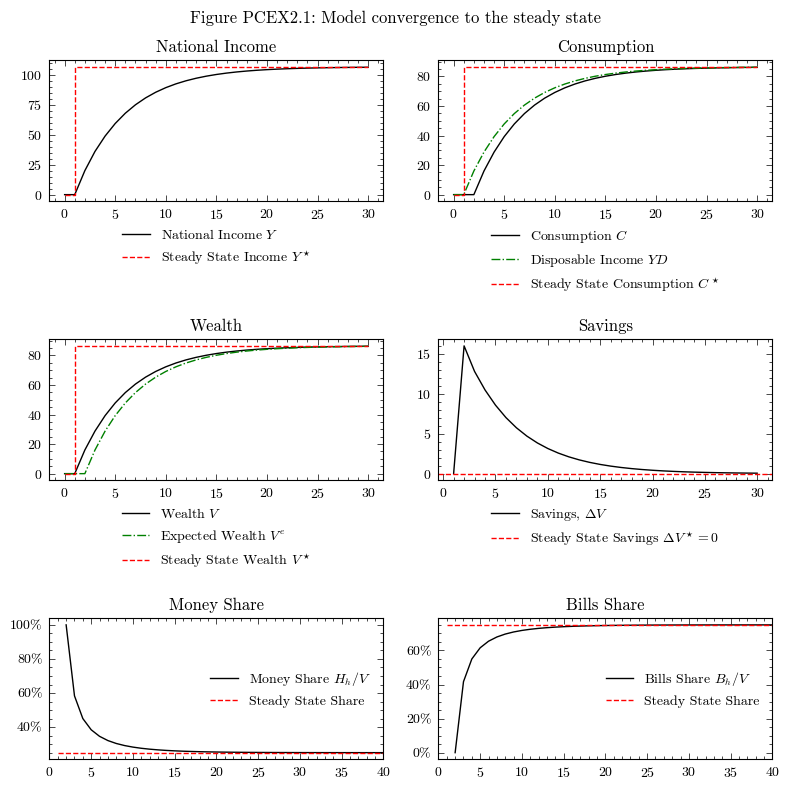
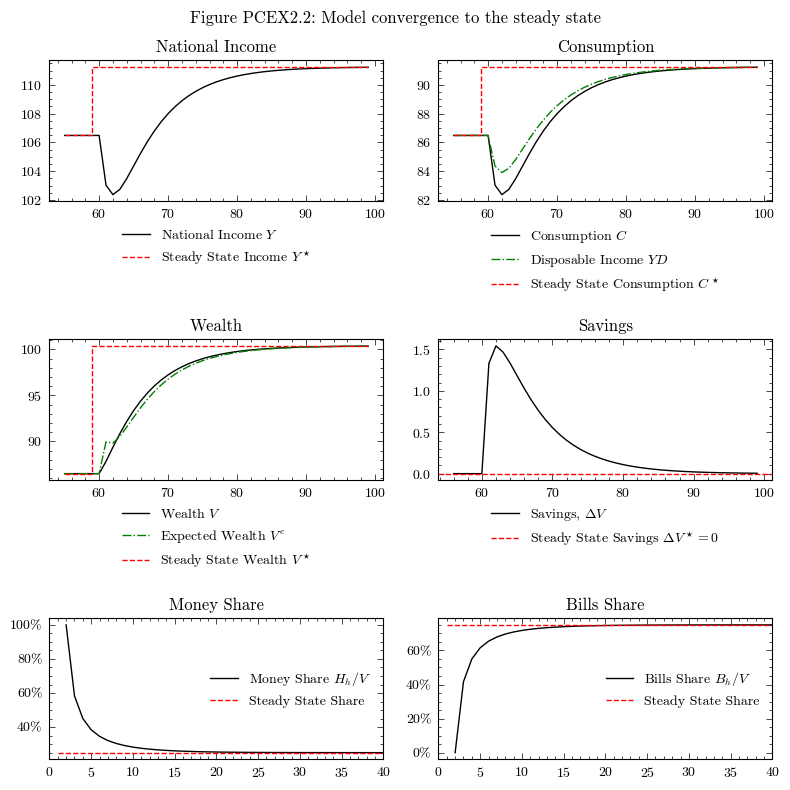
Following the convergence to the steady state, we can study the effects of an increase in the rate on bills by 100bps (Figures 4.3 and 4.4 in Godley and Lavoie [2006]).
MacroStat is set up to easily handle these scenarios. Much like in prior models, we simply define a new scenario IncreaseInterestRate and set the new rate to be 100 points higher \(r=0.025+0.01\)
model.parameters["scenario_trigger"] = 60
model.scenarios.add_scenario(
    name="IncreaseInterestRate",
    timeseries={"InterestRate":0.025 + 0.01}
)
model.simulate(scenario="IncreaseInterestRate")
output_rate_increase = model.variables.to_pandas()
INFO:root:Starting simulation. Scenario: 1
We then need to compute the new steady state values for the variables
model.compute_theoretical_steady_state(scenario="IncreaseInterestRate")
steadystate_rate_increase = model.variables.to_pandas()
INFO:root:Computing theoretical steady state. Scenario: 1
Now we can see how the model reacts to the shock.
dfo = output_rate_increase.loc[55:]
dfs = steadystate_rate_increase.loc[55:]

fig, axs = plt.subplots(ncols=2, nrows=1, figsize=(8, 3))

# National Income and Consumption
axs[0].plot(dfo.index, dfo['Taxes'], color='k', label=r'Taxes $T$')
axs[0].step(x=dfs.index,y=dfs["Taxes"], color='r', linestyle='--', label=r'Steady State Taxes $T^\star$')
axs[0].legend(loc='upper center', bbox_to_anchor=(0.5, -0.1), frameon=False)
axs[0].set_title('Taxes')
# Government Expenditure + net debt service
gov = dfo['ConsumptionGovernment'] + (dfo["InterestRate"] * dfo["GovernmentBillStock"]).shift(1)
gov_ss = dfs['ConsumptionGovernment'] + (dfs["InterestRate"] * dfs["GovernmentBillStock"])
axs[1].plot(dfo.index, gov, color='k', label=r'Government Expenditure + net debt service $G(t) + r(t-1)B_{CB}(t-1)$')
axs[1].step(x=dfs.index,y=gov_ss, color='r', linestyle='--', label=r'Steady State')
axs[1].legend(loc='upper center', bbox_to_anchor=(0.5, -0.1), frameon=False)
axs[1].set_title('Government Expenditure + net debt service')

fig.suptitle('Figure PCEX2.3: tax revenues and government expenditures including net debt servicing')
plt.tight_layout()
plt.show()